Yubico YubiKey 5 Nano
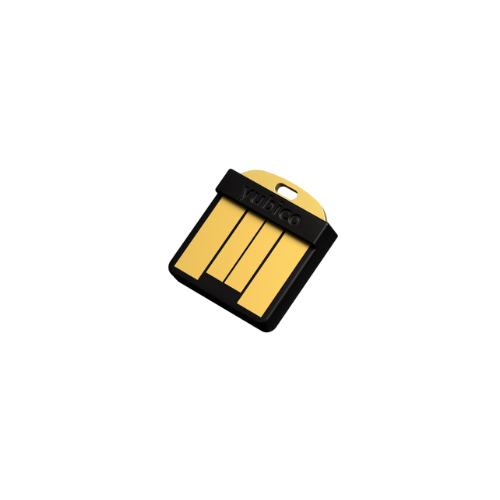
| Vendor Site | AADGUID | Style | Body Style | Origin |
|---|---|---|---|---|
| ee882879-721c-4913-9775-3dfcce97072a | Nano key | Injection molded | United States or Sweden |
| Waterproof rating | Biometric | USB | NFC | BT |
|---|---|---|---|---|
| IP68 | No | USB-A | No | No |
| FIDO Authenticator Level | FIPS Certified | Microsoft Verified |
|---|---|---|
| Level 1 | FIPS 140 Available | Yes |
Overview
If you could take a YubiKey and saw off the top, you would have the YubiKey 5 Nano. The nano key form factor really makes this key one that really suits scenarios where you are looking to leave the key within the system. Much of the body is the USB connector, with a small sliver of plastic with Yubico emblazoned onto it, and the capacitive touch presence sensor on the end combined with a tiny loophole and a tiny status LED on the side of the device.
In practicality the primary use case of the 5 Nano, because of its size would be on a device where the key is to be left within it – think something like a Windows Hello for Business alternative but emphasizing that the key stays within the device. The loophole on the end of it is too small for most keychains and depending on how the device it’s being inserted into is manufactured, the key itself can be recessed within. On one test device I had to use a bent paperclip to remove the key.
Available features and management
Just like its siblings in the YubiKey 5 range, the 5 Nano offers FIDO2 as well as FIDO U2F, HOTP, TOTP, smartcard, OpenPGP, and secure static password – some of those features requiring the associated YubiKey Manager software to leverage.
Enrollment and usage
The key enrolled in Azure AD without issue.
The key worked consistently after enrollment without issue.
The key was factory reset without issue.